Building My Stunning Profile Website: A Journey with AI-Assisted Development

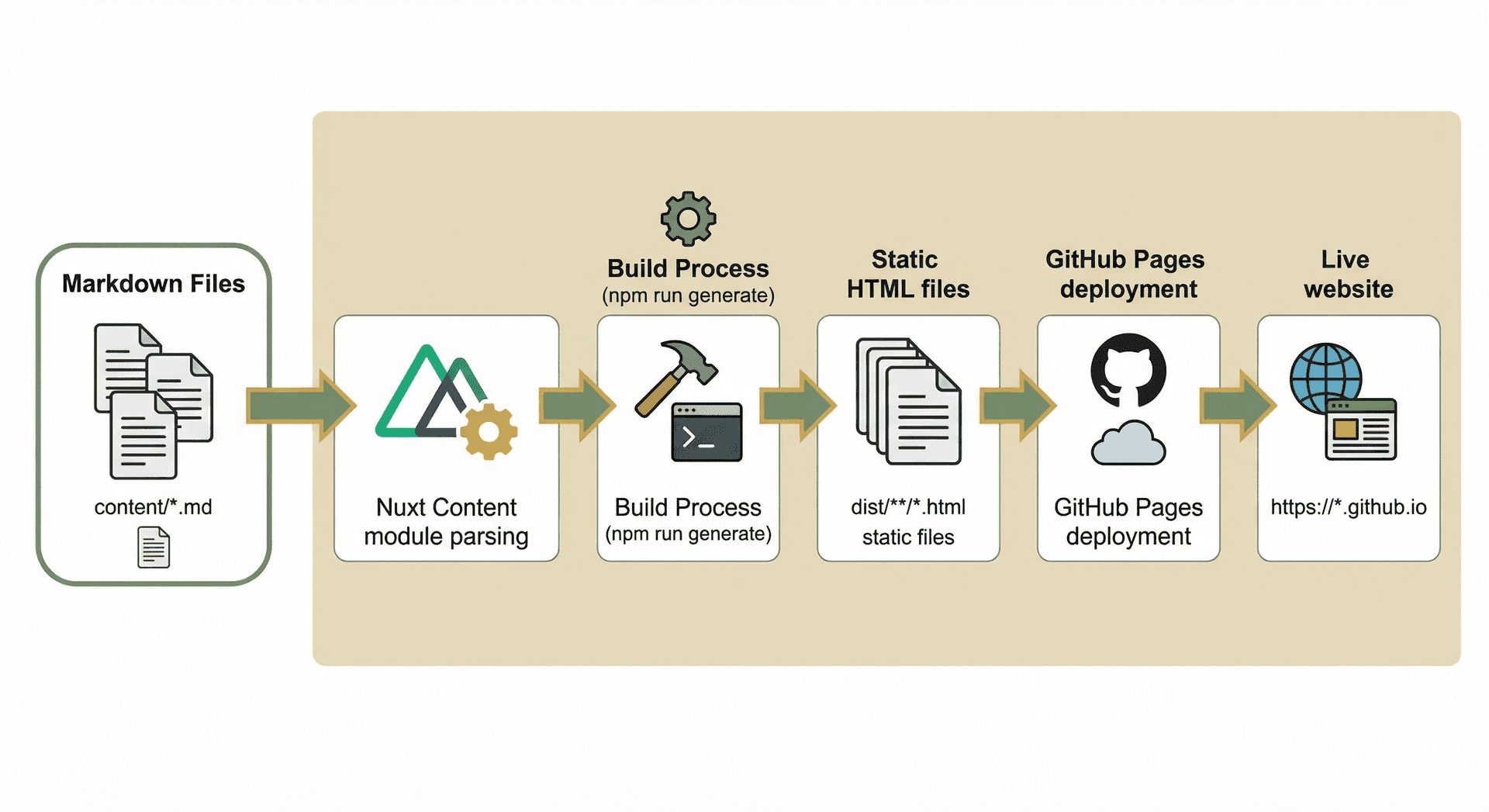
Introduction: The Vision
As a technology leader with over 20 years of experience, I wanted a portfolio website that wasn't just a resume—it needed to be a living, breathing showcase of my professional journey. The requirements were clear:
- Beautiful, modern design that reflects professionalism
- Easy content management without dealing with databases or CMS complexity
- Fast, SEO-friendly static site generation
- Free hosting with zero ongoing costs
- Blog capability to share insights and learnings
The solution? Nuxt 3 with Nuxt Content for a markdown-based, database-free content management system, styled with Tailwind CSS, and deployed for free on GitHub Pages.
The AI-Assisted Development Journey
Starting with a Plan
My journey began with a comprehensive plan document that outlined the entire project structure, design system, and implementation steps. Using Cursor (an AI-powered code editor), I was able to iterate rapidly through the development process.
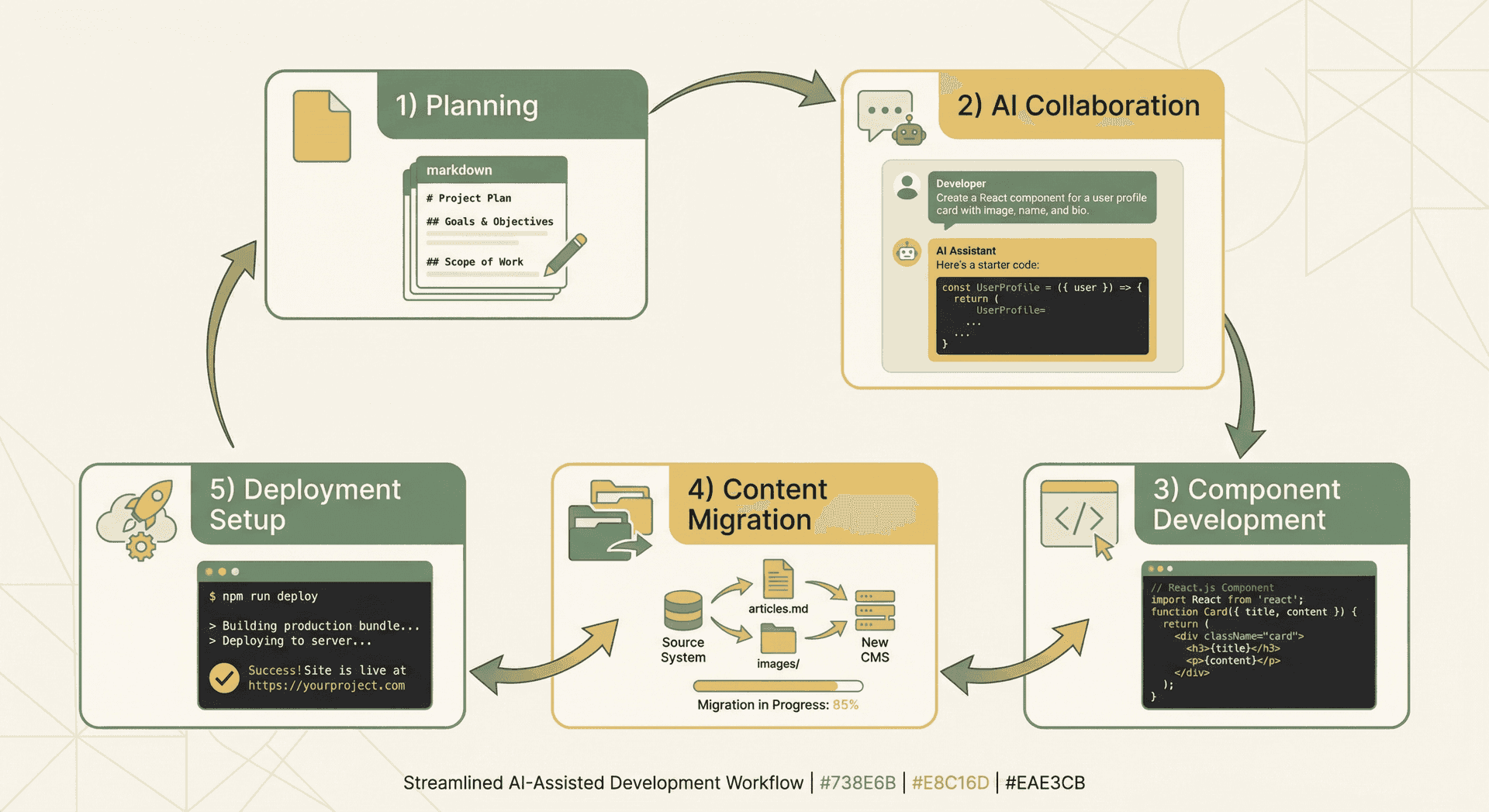
Iterative AI Collaboration
The beauty of AI pair programming is the ability to describe what you want and see it come to life. Here's how the iteration worked:
- Initial Setup: "Create a Nuxt 3 project with Nuxt Content and Tailwind CSS"
- AI generated the project structure,
package.json, and configuration files
- AI generated the project structure,
- Design System: "Configure Tailwind with a custom color palette extracted from my branding"
- AI set up the color system: Primary (
#738E6B), Secondary (#EAE3CB), Accent (#E8C16D), and Inverse (#F0F0F0)
- AI set up the color system: Primary (
- Component Development: "Create a Hero section with gradient backgrounds and animated elements"
- AI built reusable Vue components with proper TypeScript types
- Content Migration: "Transform my markdown files from ProfileFinal folder into Nuxt Content format"
- AI helped restructure content with proper frontmatter and metadata
- Deployment Setup: "Set up GitHub Actions to automatically deploy to GitHub Pages"
- AI created the complete CI/CD workflow
Each iteration built upon the previous one, with AI handling the boilerplate while I focused on the creative and strategic decisions.
The Software Stack
Core Technologies
Nuxt 3 (^3.12.0)
- Vue.js framework optimized for static site generation
- File-based routing (automatic from
pages/directory) - Server-side rendering (SSR) and static site generation (SSG) support
- Built-in TypeScript support
Nuxt Content (^2.12.0)
- Markdown-based content management
- Frontmatter parsing (YAML metadata)
- Content querying API (
queryContent()) - Code syntax highlighting
- No database required—content lives in markdown files
Tailwind CSS (^3.4.0)
- Utility-first CSS framework
- Custom design system with branded colors
- Responsive, mobile-first approach
- Minimal CSS footprint
Heroicons (^2.1.0)
- Beautiful, consistent SVG icons
- Outline and solid variants
- Tree-shakeable (only imports what you use)
Google Fonts (@nuxtjs/google-fonts ^3.0.2)
- Optimized font loading via Nuxt module
- Inter font family with weights 400, 500, 600, 700
- Prefetch, preconnect, and preload enabled for performance
Development Tools
- TypeScript: Type-safe development
- ESLint: Code quality
- PostCSS: CSS processing
- Vite: Lightning-fast build tool (bundled with Nuxt)
- Sharp: High-performance image compression for build optimization
- Glob: File pattern matching for automated image processing
Architecture: Database-Free Content Management
How Nuxt Content Works
The magic of Nuxt Content is that it eliminates the need for a database while providing a powerful content management system. Here's how it works:
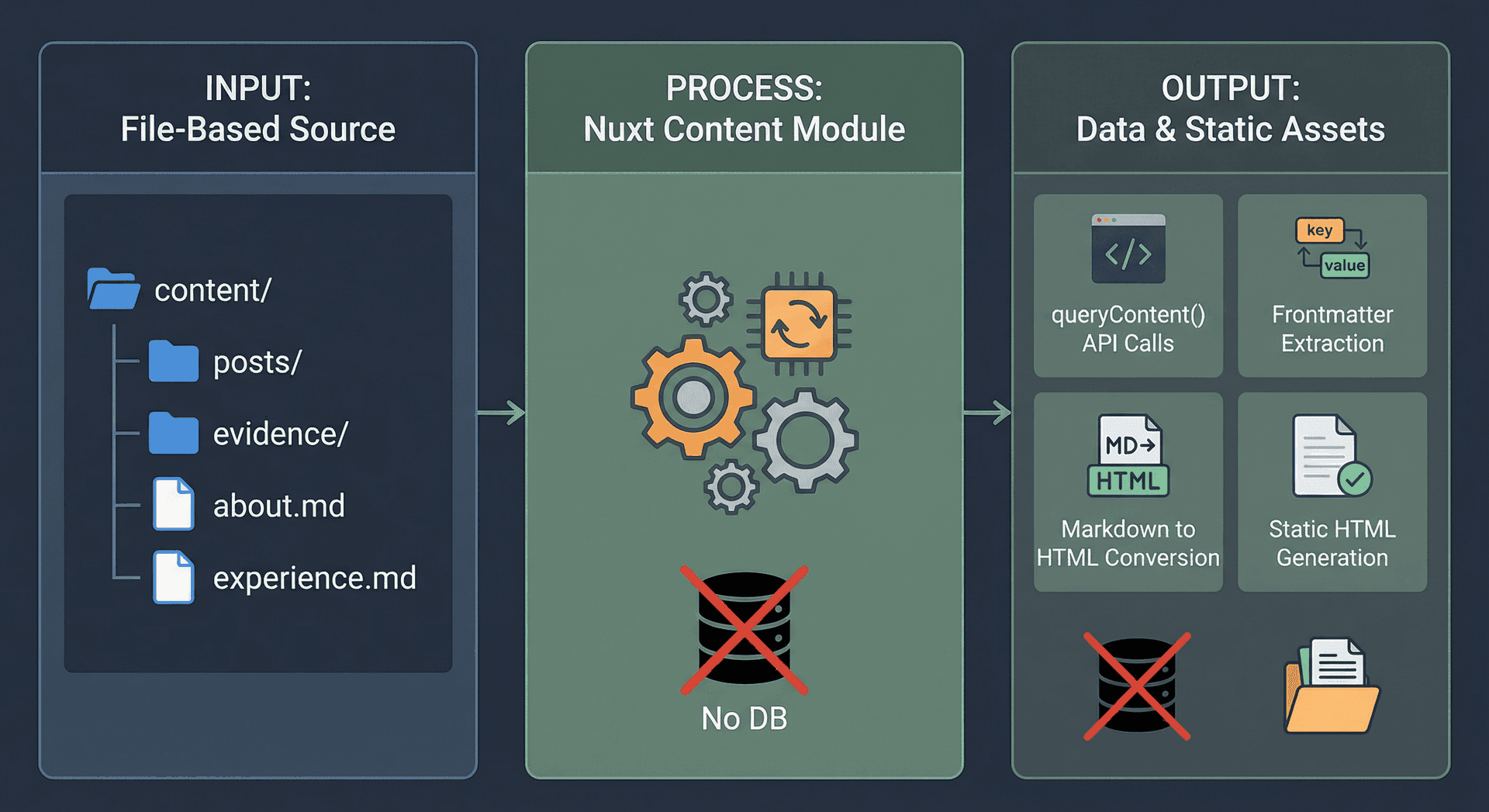
1. File-Based Content Storage
All content lives as markdown files in the content/ directory:
content/
├── about.md              # About page content
├── experience.md         # Professional experience
├── education.md          # Educational background
├── certifications.md     # Certifications list
├── summary-cards.md      # Landing page cards data
├── summary.md            # Hero section summary
├── recommendations.md    # Peer endorsements and testimonials
├── posts/                # Blog posts
│   ├── welcome.md
│   ├── ai-cloud-transformation.md
│   ├── building-my-profile-website.md
│   └── ...
└── evidence/             # Yearly evidence files
    ├── 2025.md
    ├── 2024.md
    └── ...
2. Frontmatter Metadata
Each markdown file starts with YAML frontmatter that provides metadata:
---
title: "Building My Stunning Profile Website"
description: "How I built a beautiful portfolio website..."
image: "/images/posts/me.jpg"
date: "2025-01-28"
tags: ["nuxt", "vue", "github-pages"]
published: true
---

# Your Content Here
3. Content Querying API
Nuxt Content provides a powerful query API that works at build time:
// Query all blog posts
const { data: posts } = await useAsyncData('posts', () =>
  queryContent('posts')
    .where({ published: { $ne: false } })
    .sort({ date: -1 })
    .find()
)

// Query a single post by slug
const { data: post } = await useAsyncData(`post-${slug}`, () =>
  queryContent(`/posts/${slug}`).findOne()
)

// Query content with frontmatter filtering
const { data: summaryCards } = await useAsyncData('summary-cards', () =>
  queryContent('/summary-cards').findOne()
)
4. Build-Time Processing
During npm run generate, Nuxt Content:
- Parses all markdown files
- Extracts frontmatter
- Converts markdown to HTML
- Creates a searchable content index
- Generates static HTML files
Result: A fully static website with zero database queries at runtime.
Content Management Workflow
Adding New Content
Adding new content is as simple as creating a markdown file:
- Create a new file in the appropriate
content/subdirectory - Add frontmatter with metadata
- Write content in markdown
- Commit and push to GitHub
- GitHub Actions automatically rebuilds and deploys
Example: Adding a Blog Post
# content/posts/my-new-post.md

---
title: "My New Post"
description: "A fascinating article about..."
date: "2025-01-28"
tags: ["technology", "leadership"]
published: true
---

# My New Post

This is the content of my post. I can use **markdown** formatting,
code blocks, and even embed images!
That's it! No database migrations, no CMS interface, no complex setup—just markdown files.
Content Organization
The site uses a hybrid approach:
- Structured Content: Pages like
/about,/experiencepull from dedicated markdown files - Dynamic Content: Blog posts (
/posts/[slug]) and evidence pages (/evidence/[year]) use dynamic routing - Data-Driven Components: Summary cards pull from
summary-cards.mdfrontmatter, making them easy to update
Design System & Branding
Color Palette
The design uses a carefully curated color palette:
- Primary (
#738E6B): Muted olive green for headers, CTAs, and brand elements - Secondary (
#EAE3CB): Pale beige for backgrounds and subtle accents - Accent (
#E8C16D): Metallic gold for highlights, badges, and interactive elements - Inverse (
#F0F0F0): Off-white for card backgrounds and light sections
The color palette is integrated throughout the design: Primary (#738E6B) for headers and CTAs, Secondary (#EAE3CB) for backgrounds, and Accent (#E8C16D) for highlights.
Typography
- Font Family: Inter (with Futura PT fallback)
- Headings: Bold, using primary color
- Body: Regular weight, optimized for readability
Component Library
Reusable components ensure consistency:
- Hero Section: Gradient backgrounds, animated elements, CTA buttons
- Summary Cards: Metrics display with icons
- Career Timeline: Visual vertical timeline showing career progression with milestones
- Milestone Cards: Individual career milestone displays with promotions and achievements
- Recommendations: Peer endorsements with "View All" functionality
- Timeline Component: Visual employment history
- Certifications Grid: Visual grid layout
- Post Cards: Blog post previews with images
- Social Share: Share buttons for X.com and LinkedIn
GitHub Pages Deployment
The Challenge
Deploying a Nuxt 3 site from a subfolder (profile_website/) to GitHub Pages requires:
- Building the static site in the correct directory
- Configuring the base URL for GitHub Pages paths
- Setting up automated deployment via GitHub Actions
The Solution: GitHub Actions Workflow
I created a .github/workflows/deploy.yml file that:
name: Deploy to GitHub Pages

on:
  push:
    branches: [main]
  workflow_dispatch:

jobs:
  build_site:
    runs-on: ubuntu-latest
    steps:
      - name: Checkout
        uses: actions/checkout@v4

      - name: Setup Node
        uses: actions/setup-node@v4
        with:
          node-version: "20"
          cache: "npm"
          cache-dependency-path: "profile_website/package-lock.json"

      - name: Install dependencies
        run: npm install
        working-directory: profile_website

      - name: Generate Static Site
        run: npm run generate
        working-directory: profile_website

      - name: Upload Artifacts
        uses: actions/upload-pages-artifact@v3
        with:
          path: profile_website/.output/public

  deploy:
    needs: build_site
    runs-on: ubuntu-latest
    environment:
      name: github-pages
      url: ${{ steps.deployment.outputs.page_url }}
    steps:
      - name: Deploy to GitHub Pages
        id: deployment
        uses: actions/deploy-pages@v4
Configuration Steps
- Set Base URL: Updated
nuxt.config.ts:app: { baseURL: '/resume/', // Repository name } - Enable GitHub Pages: In repository Settings → Pages, set source to "GitHub Actions"
- Configure Environment: In Settings → Environments →
github-pages, allow themainbranch to deploy
Deployment Flow
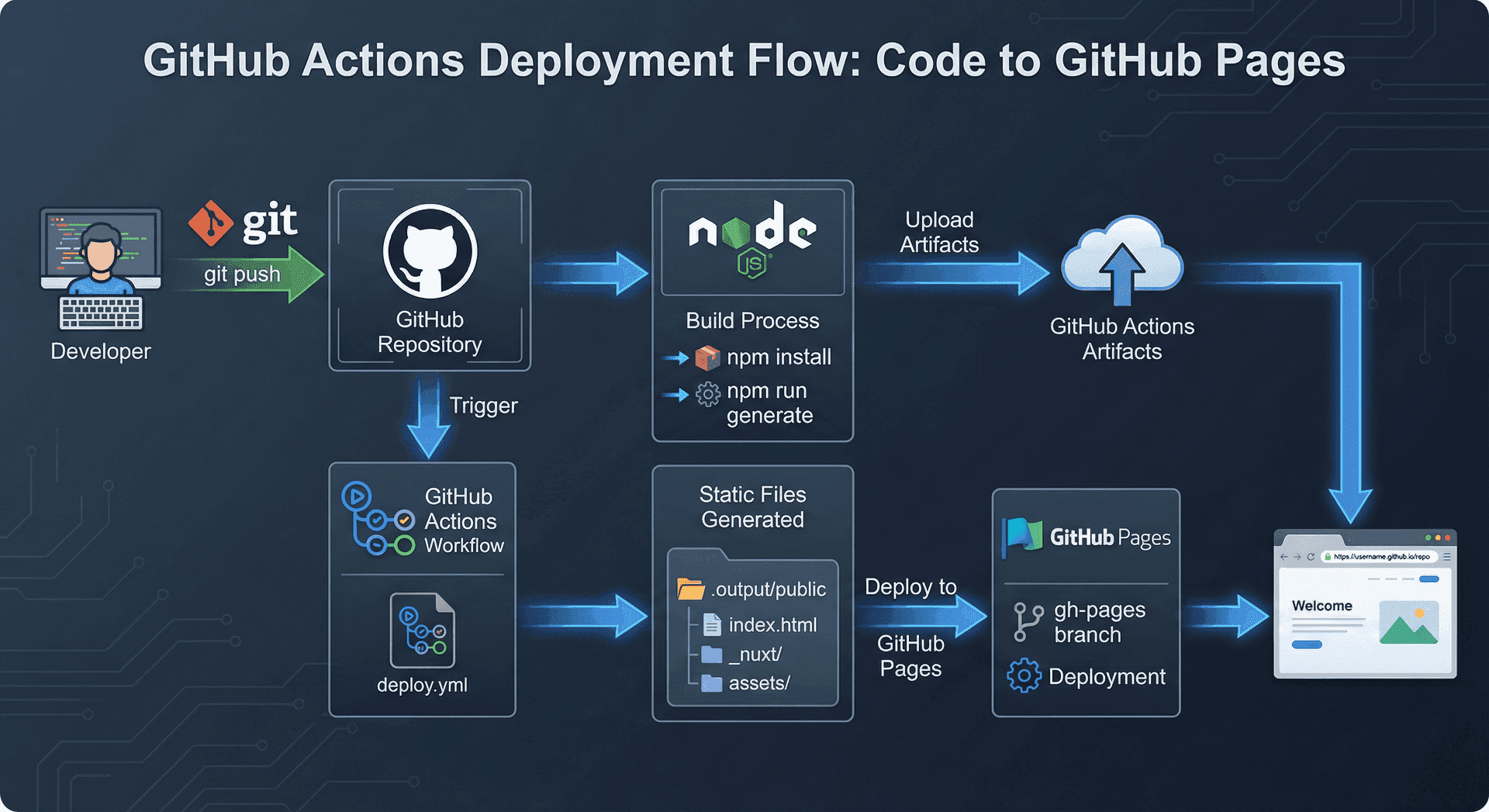
Push to main branch
    ↓
GitHub Actions triggers
    ↓
Install dependencies
    ↓
Run `npm run generate`
    ↓
Upload static files (.output/public)
    ↓
Deploy to GitHub Pages
    ↓
Site live at https://prishanf.github.io/resume/
Result: Every push to main automatically rebuilds and deploys the site—zero manual steps required.
Key Features Implemented
1. Hero Section with Animations
The landing page features a stunning hero section with:
- Gradient backgrounds with subtle patterns
- Animated pulsing indicator
- Large, bold typography
- Call-to-action buttons with hover effects
2. Summary Cards
Dynamic cards that pull from summary-cards.md:
- Key metrics (20+ years experience, 12+ certifications)
- Visual icons from Heroicons
- Links to detailed pages
- Responsive grid layout
3. Blog System
Full-featured blog with:
- Post listing page (
/posts) - Individual post pages (
/posts/[slug]) - Social sharing (X.com and LinkedIn)
- Featured images
- Tag support
- Excerpt previews
4. Dynamic Evidence Pages
Year-based evidence pages (/evidence/[year]) that:
- Dynamically route based on year parameter
- Pull content from
content/evidence/[year].md - Display achievements and highlights
5. Resume Download
Prominent download buttons throughout the site:
- Hero section CTA
- Header navigation
- Direct link to
/resume.pdf
6. Career Timeline
A visually stunning career progression display:
- Vertical timeline layout with color-coded milestones
CareerTimeline.vuecomponent for the main timeline structureMilestoneCard.vuefor individual achievements and promotionsuseCareerTimeline.jscomposable that parses experience data into a structured format- Highlights key career milestones, role transitions, and achievements
- Responsive design that adapts beautifully to mobile
7. Endorsements & Recommendations
Social proof through peer testimonials:
Recommendations.vuecomponent showing featured endorsements on the home page- Dedicated
/endorsementspage displaying all testimonials - Content managed via
recommendations.mdwith structured frontmatter - "View All Endorsements" link for easy navigation
- Displays colleague name, title, relationship, and full recommendation text
Performance & SEO
Static Site Generation Benefits
- Zero Database Queries: All content is pre-rendered at build time
- Fast Load Times: Static HTML files served from CDN
- SEO Optimized: Full HTML content available to search engines
- Cost Effective: No server costs, no database costs
Optimizations
- Code Splitting: Nuxt automatically splits code by route
- Image Optimization: Automated compression pipeline (see below)
- CSS Purging: Tailwind removes unused styles
- Minification: Production builds are minified and optimized
- Google Fonts: Integrated via
@nuxtjs/google-fontsmodule with prefetch, preconnect, and preload for optimal loading
Image Compression Pipeline
The Problem
Large images can significantly slow down page load times. With multiple hero images, blog post images, and profile photos, the site's image payload was becoming a performance concern.
The Solution: Automated Compression
I built a custom image compression script using Sharp that runs automatically before every build:
// scripts/compress_images.mjs
import sharp from 'sharp';
import { glob } from 'glob';

const MAX_WIDTH = 1920; // 1080p+
const SIZE_THRESHOLD = 500 * 1024; // 500KB

// Process images larger than 500KB
// Resize to max 1920px width
// Apply format-specific compression (JPEG: mozjpeg, PNG: palette optimization)
How It Works
- Automatic Trigger: The compression script runs before
buildandgenerate:"scripts": { "build": "npm run compress && nuxt build", "generate": "npm run compress && nuxt generate", "compress": "node scripts/compress_images.mjs" } - Smart Processing: Only images over 500KB are processed, avoiding unnecessary re-compression
- Format-Aware Optimization:
- JPEG/JPG: Uses mozjpeg encoder at 80% quality
- PNG: Applies palette optimization with compression level 9
- Size Protection: Only saves if compression actually reduced file size
Results
The pipeline typically achieves 50-70% reduction in image file sizes while maintaining visual quality, significantly improving page load times.
Lessons Learned
What Worked Well
- AI-Assisted Development: Rapid iteration and prototyping
- Nuxt Content: Perfect balance of simplicity and power
- Tailwind CSS: Fast styling without writing custom CSS
- GitHub Pages: Free, reliable hosting with automatic deployments
Challenges Overcome
- Subfolder Deployment: Required careful configuration of
baseURLand workflow paths - Environment Protection Rules: Had to configure GitHub Pages environment to allow
mainbranch - Content Structure: Migrating from unstructured markdown to Nuxt Content format required careful planning
Conclusion
Building this website was a perfect example of modern web development:
- AI-powered development accelerated the process
- Static site generation eliminated complexity
- Markdown-based content made updates simple
- Free hosting removed cost barriers
The result? A beautiful, fast, SEO-friendly portfolio website that showcases my professional journey—all without a single database query or server configuration.
Try It Yourself
If you're interested in building something similar:
- Start with Nuxt 3:
npx nuxi@latest init my-site - Add Nuxt Content:
npm install @nuxt/content - Style with Tailwind:
npm install -D @nuxtjs/tailwindcss - Deploy to GitHub Pages: Use the workflow I shared above
The future of web development is simpler, faster, and more accessible—and AI is helping us get there faster.
Want to see the site in action? Visit https://prishanf.github.io/resume/
Interested in the code? Check out the repository: https://github.com/prishanf/resume
Built with ❤️ using Nuxt 3, Nuxt Content, Tailwind CSS, and AI-powered development tools.
Summary
How I built a beautiful, content-rich portfolio website using Nuxt 3, Nuxt Content, and Tailwind CSS, then deployed it for free on GitHub Pages—all with the help of AI pair programming.